

🏢 Enterprise
Looking for the Organization Insights export — the date-range CSV download on the Insights page? That’s the current export; see Exporting activity data to CSV. This page documents the older enterprise Activity Export (JSON) and the Org Analytics Export, which the Organization Insights export is replacing.
What is this feature?
Playlab offers two types of exports to help Enterprise Organizations track and understand platform usage: Activity Exports and Org Analytics Exports. These exports provide detailed insights into user interactions, app usage, and organizational trends across your workspace.Rationale for the feature
Enterprise Organizations need comprehensive data insights to understand how their teams are using Playlab, track engagement patterns, and make informed decisions about AI tool adoption. The data export features provide detailed analytics and activity logs that help administrators monitor usage, identify trends, and optimize their Playlab deployment.Types of Data Exports
1. Activity Export (JSON file)
This export gives you a detailed look at user interactions across selected apps during a specific time range (up to 31 days). Perfect for analyzing detailed usage patterns and AI interactions.Activity Export
Format: JSON file
Time Range: Up to 31 days
Best for: Detailed conversation analysisGet granular insights into user interactions across selected apps. Perfect for analyzing detailed usage patterns and AI interactions. What you’ll get:Time range and export metadata Selected apps and users (id, name, email) Detailed conversation data including:Model name and temperature settings User information and timestamps Conversation metrics (message counts, flags, moderation) Complete message content with feedback and file attachments Source attribution (AI provider vs. user)
Time Range: Up to 31 days
Best for: Detailed conversation analysisGet granular insights into user interactions across selected apps. Perfect for analyzing detailed usage patterns and AI interactions. What you’ll get:Time range and export metadata Selected apps and users (id, name, email) Detailed conversation data including:Model name and temperature settings User information and timestamps Conversation metrics (message counts, flags, moderation) Complete message content with feedback and file attachments Source attribution (AI provider vs. user)
Org Analytics Export
Format: ZIP file with 4 CSVs
Time Range: Monthly snapshots
Best for: High-level organizational trendsGet comprehensive organizational insights across your entire Playlab deployment with four detailed CSV reports. What you’ll get:user-analytics.csv: Creator activity, apps created/published, categories app-analytics.csv: App performance, user engagement, session metrics category-analytics.csv: Category distribution across active apps general-analytics.csv: Organization-wide summary statistics
Time Range: Monthly snapshots
Best for: High-level organizational trendsGet comprehensive organizational insights across your entire Playlab deployment with four detailed CSV reports. What you’ll get:user-analytics.csv: Creator activity, apps created/published, categories app-analytics.csv: App performance, user engagement, session metrics category-analytics.csv: Category distribution across active apps general-analytics.csv: Organization-wide summary statistics
Who can export data?
Activity Export: Org administrators who also belong to a specific workspace. Org Analytics Export: Org administrators who can view the org analytics page.How to export Activity Data
1
Navigate to your workspace
Log into your Playlab account and go to your workspace.
2
Access the activity section
Click on “Activity” in your workspace.
3
Select date range
Important: Select a date range of up to 31 days. Without a date range, you will not be allowed to export data.
4
Apply filters (optional)
Any filters you select for users, apps, or sections will also be applied to the export.
5
Export the data
In the dropdown menu, select “Export activity data (JSON)” to download your export file.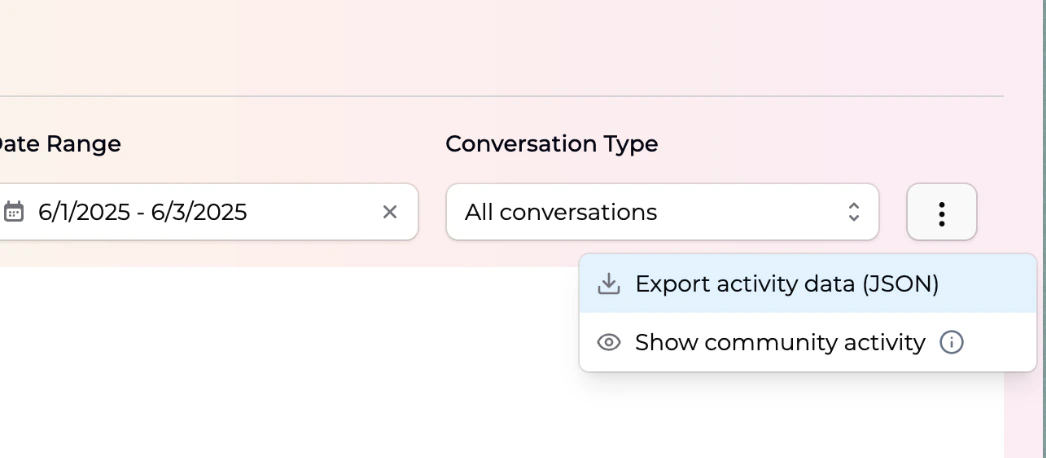
How to export Org Analytics
1
Access organization analytics
Navigate to the organization analytics page in your admin dashboard.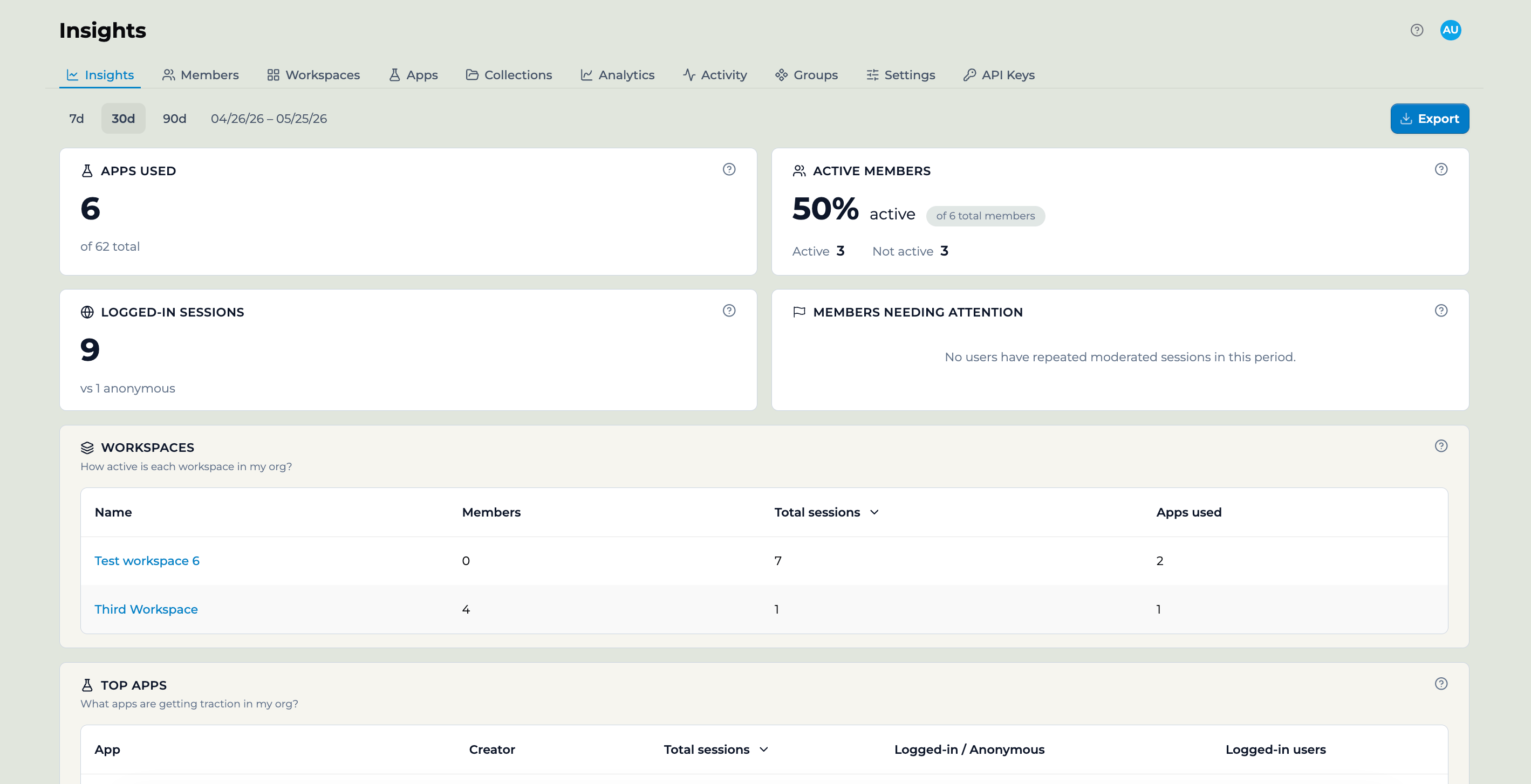
2
Download the export
Click on “Export” to download the ZIP file containing all four CSV analytics files.
Sample Activity Export
Tips for Using Data Exports
- Plan your date ranges: Activity exports are limited to 31-day periods, so plan multiple exports for longer time ranges.
- Use filters strategically: Apply user and app filters to focus on specific teams or projects.
- Regular monitoring: Set up regular export schedules to track trends over time.
- Data analysis: Use the CSV format from Org Analytics for easy analysis in spreadsheet applications.
- Privacy considerations: Ensure exported data is handled according to your organization’s data privacy policies.
FAQ
How do I request export functionality for my organization?
How do I request export functionality for my organization?
Data export features are available to enterprise Playlab partners only and must be enabled by our team. Contact support at partnerships@playlab.ai to enable export functionality for your organization.
What's the difference between Activity Export and Org Analytics Export?
What's the difference between Activity Export and Org Analytics Export?
Activity Export provides detailed conversation-level data for a specific time period (up to 31 days), while Org Analytics Export gives you monthly organizational trends and high-level statistics across four different categories.
Can I export data for longer than 31 days?
Can I export data for longer than 31 days?
For Activity Exports, you’re limited to 31-day periods. For longer time ranges, you’ll need to make multiple export requests. Org Analytics Exports can cover longer periods as they’re designed for monthly snapshots.
What data is included about user interactions?
What data is included about user interactions?
Activity exports include detailed message content, timestamps, user information, conversation metrics, moderation flags, and file attachment information. All data respects user privacy while providing comprehensive usage insights.
How often can I export data?
How often can I export data?
There are no specific limits on export frequency, but exports are designed for periodic analysis rather than real-time monitoring. Contact support if you need frequent exports for specific use cases.
What file formats are the exports in?
What file formats are the exports in?
Activity Exports are provided as JSON files for detailed data structure, while Org Analytics Exports are ZIP files containing CSV files for easy analysis in spreadsheet applications.
We Want Your Feedback!
If you need additional support or have feedback please contact us at support@playlab.aiLast updated: 09-02-2025